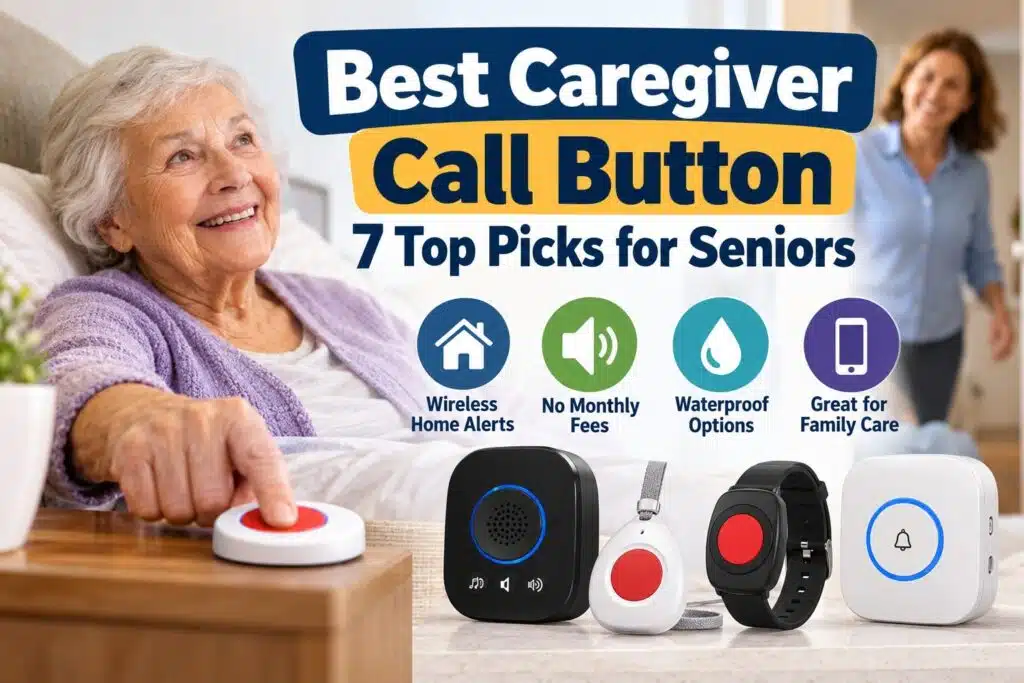
Finding the Best Caregiver Call Button can make everyday life easier for older adults who need a simple way to ask for help. I’ve compared seven caregiver alert systems sold on Amazon.com, focusing on ease of use, wireless range, alert options and suitability for seniors living with family or caregivers.
My recommendations are based on product information and practical buying considerations, rather than personal testing.
A wireless caregiver call button is particularly useful for someone recovering from surgery, living with limited mobility or needing assistance getting out of bed. Pressing a button can alert a family member in another room without shouting or reaching for a phone.
The main thing to understand is that most caregiver pagers are designed for help within the home. They don’t automatically call 911 or notify relatives who live elsewhere.
As an Amazon Associate, Senior Wise Plus earns from qualifying purchases.
Best Caregiver Call Button Comparison
| Product | Best for | Price tier |
|---|---|---|
| CallToU Wireless Caregiver Pager | Overall home use | Budget |
| Medical Life Alert System Wireless Caregiver Monitoring System | Bedroom assistance | Budget |
| App-Controlled SOS Button System | Connected family alerts | Higher |
| DAYTECH Caregiver Call Button | Everyday family care | Budget |
| SYNLETT Wireless Caregiver Pager | Home assistance | Budget |
| CallToU TY01WH Emergency System | Multiple calling points | Mid-range |
| Wireless Caregiver Vibration Pager | Quiet and discreet alerts | Mid-range |
Price tiers are broad buying categories, not verified current prices. Product configurations, availability and included accessories can change.
How to Choose a Caregiver Call Button
Before choosing a caregiver alert system, I’d start with one question. Where will the person receiving the alert be?
A caregiver sleeping in the next bedroom needs something different from an adult child living several miles away.
Wireless Range and Home Layout
Most wireless caregiver pager systems use radio signals to communicate between a call button and a receiver.
Manufacturers often advertise impressive transmission distances, but these usually reflect open spaces. Walls, floors, metal appliances and other obstacles can reduce the working range.
For a two-story house, I’d look for a long-range caregiver pager and test the button from every room where help might be needed.
A receiver that works perfectly in the living room isn’t much use if someone presses the button upstairs and nobody hears the alert.
Easy-to-Press Buttons
Small buttons can be difficult for older adults with arthritis, tremors or reduced hand strength.
I’d prioritize a large, clearly marked button that doesn’t require much pressure.
Wearable buttons are useful for people who move around the house. A bedside caregiver call button is a sensible alternative for someone who spends considerable time resting.
The person using the system should be able to press the button comfortably without looking at the controls.
Audible, Vibration and Flashing Alerts
Some caregiver pagers sound a chime when someone presses the call button. Others offer vibration alerts or flashing lights.
Audible alarms work well when caregivers are moving around the home. Vibration alerts are useful when someone wants to receive notifications without disturbing other family members.
For caregivers with hearing difficulties, a flashing light or vibrating receiver can provide another way to notice a request for assistance.
Check which alert modes are supported by the exact model you choose.
Waterproof Buttons for Bathrooms
Bathrooms are a common place for older adults to need assistance.
A waterproof caregiver call button may be useful near a shower, bathtub or toilet, but water resistance varies between products.
Don’t assume a button can be submerged simply because the manufacturer describes it as waterproof. Check its IP rating and installation instructions.
For broader bathroom improvements, see : How to Make a Small Bathroom Accessible for Seniors.
Battery Life and Power Supply
Check whether the call button uses replaceable batteries, rechargeable batteries or another power source.
Some receivers plug into a wall outlet, while others are portable.
A portable receiver is convenient because the caregiver can carry it around the house. A plug-in receiver avoids the need to recharge the receiving unit, but it must remain connected to power.
I’d also check whether the system has a low-battery warning and how easily batteries can be replaced.
Phone Notifications and Remote Alerts
This is one of the biggest differences between caregiver call systems.
A traditional wireless pager sends a signal to a nearby receiver. A smart caregiver call button may send notifications to a smartphone through WiFi and an app.
For a panic button for seniors to call family members who live elsewhere, remote phone notifications are essential.
Check whether the product requires internet access, whether notifications work outside the home and whether any features require a subscription.
A basic wireless pager cannot replace a monitored emergency response service.
CallToU Wireless Caregiver Pager: Best Overall
The CallToU Wireless Caregiver Pager is my first choice for families wanting a straightforward way for an older adult to request help at home.
Easy Use, Loud Whole-Home Alerts, 500+FT Through-Wall, Waterproof Call Bell Alert Buttons for Seniors/Elderly/Patients/Adults
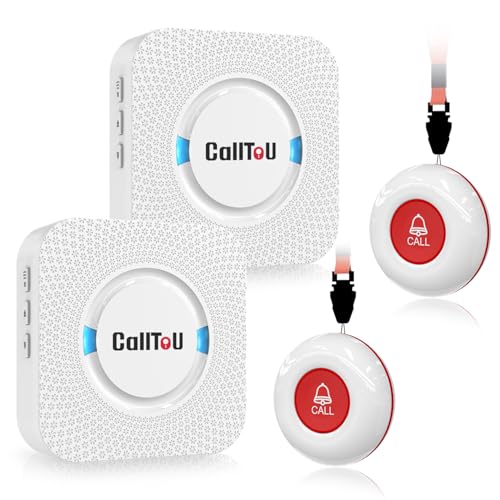
The linked product is a wireless caregiver alert system with call transmitters and receivers. The appeal is simple. Someone presses a button, and the receiver alerts the caregiver.
For a parent who needs assistance getting out of bed, reaching the bathroom or moving between rooms, that makes sense.
What works
I like the approach of using separate call buttons and receivers. You can place calling points where assistance is most frequently needed and position the receivers where caregivers are likely to hear them.
The system is designed around local wireless communication rather than a complicated smartphone setup.
That makes this type of caregiver pager appealing for households where the person needing help isn’t comfortable using apps.
What doesn’t
The main limitation is that a conventional wireless pager only alerts someone within receiving range.
It won’t automatically contact a relative across town or summon emergency services.
I’d also check the exact number of buttons and receivers included, since CallToU sells different configurations.
Who it suits
I’d choose this for an older adult living with a spouse, family member or caregiver who spends time in another room.
It’s a sensible starting point for everyday assistance without the complexity of a monitored medical alert service.
Medical Life Alert System Wireless Caregiver Monitoring System: Best for Bedside Assistance
This Wireless Caregiver Monitoring System is worth considering for seniors who spend considerable time in bed or need help during the night.
Medical Life Alert System for Seniors/Kids, SOS Emergency Panic Call Bell, Nurse Calling/Patient Assistance Help Buzzer Alarm

A bedside call button gives someone a direct way to request assistance without getting up to find a telephone.
That matters for people recovering from surgery or experiencing reduced mobility.
What works
The biggest advantage of a dedicated bedside system is accessibility.
A call button can stay within easy reach, while the receiver sits in the caregiver’s bedroom or another suitable location.
I prefer this arrangement to relying entirely on shouting for help. A caregiver may be asleep, watching television or working elsewhere in the house.
The person requesting assistance also doesn’t need to remember a phone number.
What doesn’t
A bedside button only helps when the person can reach and operate it.
If someone falls in another room, a button left on the bedside table won’t help.
I’d consider a wearable button for someone who regularly walks around the house.
Check the receiver’s volume settings and whether the system provides a visual alert.
Who it suits
This is a reasonable option for families caring for someone with limited mobility, particularly where nighttime assistance is common.
It’s also worth considering for temporary home care following an operation.
App-Controlled SOS Button System: Best for Family Alerts
This App-Controlled SOS Button System stands out because its listing describes app control, a wristband button and a receiver.
That combination makes it worth investigating if you’re looking for a panic button for seniors to call family members.
A wearable wristband can be easier to keep nearby than a button fixed to the wall.
What works
The wristband design is the feature that interests me most.
An older adult can potentially keep the call button with them while moving between rooms.
The listing also identifies a waterproof wristband, which is useful to investigate for households where bathroom access is a concern.
App functionality may appeal to family caregivers who want more control over how the system operates.
Before buying, I’d confirm exactly what the app does, particularly whether alerts reach phones outside the home.
What doesn’t
App-controlled systems can introduce extra setup.
You may need to configure a phone, connect devices and maintain an internet connection for certain features.
An app-controlled label doesn’t automatically mean remote emergency notifications are supported.
I’d also check whether any app functions involve ongoing charges.
Who it suits
I’d shortlist this system for families interested in wearable calling buttons and smartphone features.
For someone who struggles with technology, a simpler pager may be easier to manage.
DAYTECH Caregiver Call Button: Best for Everyday Family Care
The DAYTECH Caregiver Call Button is another option for households where an older adult needs to get a family member’s attention.
The linked listing identifies a two-button configuration with a receiver.
Having more than one calling point is useful, particularly when someone spends time in both a bedroom and living room.
What works
Two call buttons offer more flexibility than a single fixed button.
For example, one can remain beside the bed while another sits near a favorite chair.
That reduces the need to carry the same button around the house.
I also like the idea of a dedicated receiver that family members can recognize immediately when an alert sounds.
For straightforward home assistance, a local pager is often easier to explain than a smartphone app.
What doesn’t
Two buttons don’t necessarily provide enough coverage for every household.
Someone who uses several rooms may still need a wearable transmitter.
I’d also check whether additional receivers are supported and whether the buttons can produce distinguishable alerts.
Without separate alert identification, a caregiver may hear the alarm but not know which room needs attention.
Who it suits
This is worth considering for an elderly parent living with family members who want call buttons in two frequently used locations.
SYNLETT Wireless Caregiver Pager: Best for Simple Home Assistance
The SYNLETT Wireless Caregiver Pager is another candidate for families looking for an emergency button for elderly at home.
Its listing describes a wireless caregiver system intended for emergency assistance and fall-related care.
I see this type of product as a practical way to request help from someone already in the house.
What works
A dedicated call button avoids the extra steps involved in unlocking a phone and finding the right contact.
That’s useful for seniors who find smartphones difficult to operate.
A wireless pager can also be positioned around the home according to the person’s daily routine.
I’d focus on whether the button is comfortable to press and whether the receiver is loud enough to hear from another room.
Those details matter more than having a long list of alarm melodies.
What doesn’t
A caregiver call button does not detect a fall simply because the product description mentions fall prevention.
The person usually needs to press the button manually.
If someone loses consciousness or cannot reach the button, the system may not raise an alert.
I would also check the included accessories and advertised wireless range before choosing this model.
Who it suits
I’d consider SYNLETT for older adults who can reliably press a call button and have someone nearby to respond.
For someone living alone with a high risk of falls, I’d look at monitored medical alert systems instead.
CallToU TY01WH Emergency System: Best for Multiple Calling Points
The CallToU TY01WH Emergency System is another model from CallToU, a brand that offers several caregiver paging configurations.
The linked version is identified as a caregiver emergency calling system.
I’d compare this directly with the earlier CallToU model rather than assume the newer-looking product is automatically better.
What works
The main reason to consider another CallToU configuration is the possibility of choosing an arrangement that suits your home.
For example, families may want separate buttons for a bedroom and living room, with receivers positioned where caregivers spend time.
That arrangement can reduce the chance of someone missing a call while doing household tasks.
A straightforward wireless system is also appealing if you don’t want the responsibility of maintaining a smartphone app.
What doesn’t
The exact TY01WH package contents and supported receiver arrangements need checking against the current listing.
I wouldn’t pay extra for additional accessories unless you have a clear place to use them.
Also, don’t confuse an emergency call button with an automatic emergency response service.
The system’s ability to summon help depends on its actual alert connections.
Who it suits
I’d shortlist this model for households comparing CallToU systems and wanting to choose the most suitable button and receiver configuration.
Wireless Caregiver Vibration Pager: Best for Quiet Alerts
This Wireless Caregiver Vibration Pager is one of the more interesting options because its listing highlights vibration and multiple melodies.
A vibrating alert can be useful when a caregiver doesn’t want a loud chime disturbing everyone in the house.
What works
Vibration alerts can make a real difference during quiet activities.
For example, a caregiver might be reading, working at a desk or watching television while an older family member rests elsewhere.
A portable vibrating receiver can provide a more discreet notification than a loud wall-mounted alarm, provided the receiver supports that mode and stays with the caregiver.
The choice of alert sounds may also help households select a tone they recognize.
What doesn’t
Vibration isn’t necessarily suitable for every caregiver.
If someone leaves the receiver on a table or forgets to carry it, they may miss the alert.
I’d check whether vibration can operate alongside an audible alarm, particularly for overnight use.
Battery charging or replacement requirements are another consideration for portable receivers.
Who it suits
This is my preferred type of system for caregivers who want quieter notifications during the day.
For nighttime care, I’d prioritize a reliable audible alert unless the caregiver knows they will wake to vibration.
Which One Should You Buy?
Best for Most Families
I’d start with the CallToU Wireless Caregiver Pager.
A straightforward button-and-receiver arrangement is a sensible choice when someone needs to request help from a caregiver already in the house.
The important part is checking that the supplied configuration covers the rooms you need.
Best for Elderly Parents Who Need Nighttime Help
I’d consider the Wireless Caregiver Monitoring System.
A button placed beside the bed can make requesting assistance easier, particularly for someone recovering from surgery or having difficulty standing.
Test the alarm from the caregiver’s bedroom before relying on the system overnight.
Best for Family Members Interested in Phone Alerts
I’d investigate the App-Controlled SOS Button System.
Its wristband and app features make it an interesting candidate, but I’d confirm remote phone notifications before purchasing.
If relatives live elsewhere, a local wireless pager alone won’t meet that requirement.
Best for Caregivers Who Prefer Quiet Notifications
I’d choose the Wireless Caregiver Vibration Pager, provided its alert modes meet your needs.
Vibration can be useful during the day, while audible alarms may be more appropriate when someone is sleeping.
Best for a Tight Budget
I’d compare the CallToU, DAYTECH and SYNLETT systems.
Focus on the number of included buttons, receiver coverage and battery requirements rather than choosing the cheapest listing.
A slightly larger kit may offer better value if you need buttons in several rooms.
Best Caregiver Call Button for Seniors Living Alone
This is where I’d be more cautious about recommending a standard caregiver pager.
If an older adult lives alone, pressing a button that only activates a receiver inside the house may achieve very little.
There’s nobody nearby to hear the alert.
For seniors living independently, I’d look for a system that can contact someone outside the property.
That might mean a smart emergency button with verified remote notifications or a monitored medical alert service.
The key questions are who receives the alert, what happens if they don’t respond and whether the system works during a power or internet outage.
For families considering wider home safety improvements, see : Home Safety Equipment for Seniors.
Caregiver Call Button vs Medical Alert System
These products sound similar, but they serve different purposes.
| Feature | Wireless caregiver pager | Monitored medical alert system |
|---|---|---|
| Alerts someone at home | Yes | Depends on system |
| Calls a monitoring center | Usually no | Yes |
| Monthly subscription | Usually not required | Often required |
| Works without WiFi | Many models | Depends on system |
| Suitable for seniors living alone | Limited | Often more suitable |
| Automatic fall detection | Usually no | Available on some models |
| Emergency dispatch assistance | No | Often available |
A caregiver pager is useful for requesting help from someone nearby.
A monitored medical alert system can connect the user with a response center, which can assess the situation and arrange assistance according to the service.
Some monitored systems also offer fall detection, cellular communication and location tracking.
For information about medical alert systems, visit the National Institute on Aging.
Do Emergency Call Buttons Need a Monthly Subscription?
No. Many wireless caregiver pager systems operate without monthly monitoring fees.
You purchase the equipment and use it to send alerts between compatible buttons and receivers.
For households with a resident caregiver, an emergency call button for seniors with no monthly fee can be a practical option.
The important distinction is that you’re paying for equipment, not a professional emergency response service.
Smart systems with remote notifications may have different requirements. Check the manufacturer’s current terms before purchasing.
If you’re choosing an emergency call button for elderly without subscription fees, look closely at the features included without payment.
A one-time purchase doesn’t automatically include cellular connectivity, emergency dispatch or ongoing app support.
Where Should You Place Caregiver Call Buttons?
Placement can make a bigger difference than many people expect.
I’d start with the places where an older adult most frequently needs assistance.
The bedroom is an obvious location, especially if getting out of bed is difficult.
A second button near a favorite chair may help someone who spends much of the day in the living room.
Bathrooms deserve attention too. A call button should be reachable from the toilet or bathing area, and its water-resistance rating must suit the location.
For people who regularly move around the home, a wearable emergency call button may be more useful than several fixed buttons.
The CDC’s Older Adult Fall Prevention resources provide further information about reducing fall risks.
You can also read : Best Bathroom Grab Bars for Seniors for additional bathroom safety ideas.
How to Test a Wireless Caregiver Pager
Once you’ve installed a caregiver alert system, don’t assume everything works because the receiver sounds during the first test.
Walk around the property and test the button from the bedroom, bathroom, kitchen and other frequently used spaces.
Test upstairs and downstairs if the house has multiple floors.
Ask the caregiver to move to their usual locations while someone presses the button.
If the receiver is portable, check whether the caregiver can hear or feel the alert while carrying it.
I’d also repeat these tests periodically and after changing batteries or moving a receiver.
For additional advice about supporting older adults at home, the Administration for Community Living provides information for seniors and family caregivers.
Common Questions
What Is the Best Caregiver Call Button for Seniors?
For most households with a resident caregiver, I’d start by comparing the CallToU Wireless Caregiver Pager with the DAYTECH system.
Both are worth considering for simple assistance requests. The best choice depends on the number of buttons you need, the receiver arrangement and the actual signal coverage in your home.
Can a Panic Button for Seniors Call Family Members?
Yes, but only certain systems support remote communication.
A standard caregiver pager normally alerts a local receiver. To contact family members outside the home, look for verified smartphone notifications, cellular communication or a monitored service.
What Is the Best Emergency Button for Elderly People Living Alone?
I’d prioritize a medical alert system with a reliable way to contact help outside the home.
A conventional wireless pager is usually unsuitable as the sole emergency system for someone living alone because there may be nobody nearby to hear the alarm.
Do Caregiver Call Buttons Work Without WiFi?
Many wireless caregiver pager systems work without WiFi because they use direct radio communication between the button and receiver.
Smart buttons with remote phone notifications may need WiFi, cellular service or both. Check the individual product requirements.
Are Waterproof Caregiver Call Buttons Safe to Use in the Shower?
Only use a button in the shower if the manufacturer specifically approves that use.
Waterproof ratings vary, and some products are only resistant to splashes. Check the IP rating, installation instructions and whether the button can withstand direct shower spray.
My Final Recommendation
For a senior living with family, the CallToU Wireless Caregiver Pager would be my starting point. It’s the type of straightforward system I’d look for when someone needs to call for help from another room.
For households where quieter notifications matter, I’d compare the Wireless Caregiver Vibration Pager.
If you need a panic button for seniors to call family members who live elsewhere, investigate the App-Controlled SOS Button System and confirm that remote notifications are supported.
Most importantly, choose the system around the person who will use the button. Make sure they can press it comfortably, the alert reaches the right person and there’s a clear plan for responding.
A caregiver call button can make asking for assistance easier. The right choice depends on having someone available to answer.